Configuring SPF, DKIM, and DMARC for Cold Outreach Without Getting Flagged as Spam
A complete guide to the deep technical configuration of email authentication protocols. How to protect your domain's reputation and guarantee Inbox delivery in 2026.
Jonathan Sterling
Chief Deliverability Consultant & Postmaster Architect
Jonathan Sterling is an enterprise email deliverability consultant and ex-Postmaster Architect. He helps companies implement resilient SMTP relay architectures, DKIM rotation strategies, SPF/DMARC alignment, and warm up high-volume dedicated IPs safely.
With each passing year, major email providers (primarily Google, Yahoo, and Microsoft) tighten the rules for filtering incoming mail. In 2024–2026, sender authentication requirements became uncompromising: senders dispatching more than 5,000 emails per day to Gmail/Yahoo addresses are legally required to have correctly configured SPF and DKIM records, along with a strict DMARC policy.
For those engaged in Cold Outreach and B2B sales, non-compliance with these standards means an immediate landing in global blacklists (RBLs) and blocks at the spam filter level. The emails will be sent out, but the recipients will never see them.
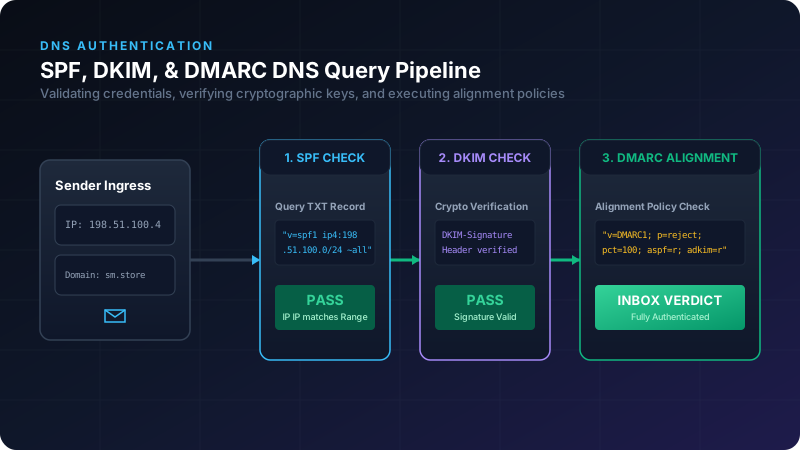
In this technical guide, we will analyze the mathematics and logic behind the SPF, DKIM, and DMARC email protocols, show examples of correct record syntax, and explain the concept of Domain Alignment, without which your configuration is meaningless.
1. SPF (Sender Policy Framework): Who Has Authorization to Send?
SPF is a text-based TXT record in your domain’s DNS that lists the servers (IP addresses) authorized to send emails on behalf of that domain.
When a receiving mail server gets an email from [email protected], it grabs the sender’s IP address and checks the TXT records for supermail.live. If the sender’s IP address is not listed in the SPF record, the check fails (SPF Fail).
Anatomy of an SPF Record:
Let’s look at a complex SPF record example:
v=spf1 ip4:198.51.100.42 include:_spf.google.com include:mailgun.org -allBreaking down the tags:
v=spf1: Specifies the protocol version.ip4:198.51.100.42: Authorizes sending from a specific dedicated IPv4 address.include:_spf.google.com: Imports the list of authorized IP addresses from the Google Workspace SPF record (if you use Google for business mail).include:mailgun.org: Imports the list of IP addresses for the Mailgun transactional email service.-all(Fail): Strict enforcement. Any server not matching the criteria above should be flatly rejected (Hard Fail).- Alternatives:
~all(SoftFail — soft rejection, where the email might be accepted but marked as suspicious) and+all(Any — authorizes any server to send mail; never use this flag!).
- Alternatives:
The Gotcha: The 10 DNS Lookup Limit
The SPF specification (RFC 7208) enforces a strict limitation: when validating SPF, the receiving server must not perform more than 10 recursive DNS lookups (totaling include, mx, a, exists queries). If your include structures are deeply nested (e.g., if you use HubSpot, Salesforce, Google, and SendGrid simultaneously), this limit will be exceeded, causing an SPF PermError. Your emails will head straight to spam.
The Solution: Perform SPF flattening (reducing records to raw IP addresses) or use specialized subdomains for different providers (e.g., sales.supermail.live for cold outreach and supermail.live for primary business communications).
2. DKIM (DomainKeys Identified Mail): Cryptographically Signing Emails
DKIM protects emails from being altered in transit and verifies the actual author using asymmetric cryptography (public and private keys).
- The sending server signs the headers and body of the email with a private key. The cryptographic signature is inserted into the email’s headers as a
DKIM-Signatureheader. - The receiving server queries the sender’s DNS for their public key using a specific subdomain called a selector.
- The receiving server decrypts the signature using the public key. If the hash matches, the check is successful (DKIM Pass).
Example of a DKIM-Signature Header in an Email:
DKIM-Signature: v=1; a=rsa-sha256; c=relaxed/relaxed; d=supermail.live;
  s=google; h=from:to:subject:date:message-id;
  bh=yXz4BaH81l102Zp4vX9A0vU3...;
  b=AbCdEfGhIjKlMnOpQrStUvWxYz...
Configuring a DNS Record for DKIM:
The record must be created at the subdomain <selector>._domainkey.<yourdomain>. The selector is provided by your email delivery platform.
Record Name: google._domainkey.supermail.live
Record Type: TXT
Value: v=DKIM1; k=rsa; p=MIIBIjANBgkqhkiG9w0BAQEFAAOCAQ8AMIIBCgKCAQEA0...[long public key]...IDAQAB
3. DMARC (Domain-based Message Authentication): The Final Arbiter and Alignment
DMARC aggregates the results of SPF and DKIM checks and instructs the receiving server on what to do with the email if the checks fail. Additionally, DMARC allows you to receive reports about mail sent on behalf of your domain.
The Concept of Domain Alignment
This is the most critical and frequent source of configuration errors. Getting a simple SPF: Pass and DKIM: Pass status is not enough. The domains in the headers must align!
DMARC requires domain alignment:
- SPF Alignment: The domain in the technical
Return-Path(orEnvelope From) header must match the domain in theFromheader (the sender address visible to the end user in their email client). - DKIM Alignment: The domain in the
d=parameter of theDKIM-Signatureheader must match the domain in theFromheader.
If you use a third-party email service that sends emails from your domain but uses its own technical domain to collect bounces (e.g., Return-Path: [email protected]), SPF alignment will fail (SPF Alignment: Fail), even if the SPF record itself is valid. In this scenario, only DKIM alignment can rescue the email’s deliverability (provided the email is cryptographically signed with your own key, e.g., d=supermail.live).
Example of a DMARC Record:
Record Name: _dmarc.supermail.live
Record Type: TXT
Value: v=DMARC1; p=reject; rua=mailto:[email protected]; pct=100; adkim=r; aspf=r
Breaking down the parameters:
p=reject: The policy for handling emails failing DMARC validation.p=none: Monitor-only (used during initial testing).p=quarantine: Send suspicious emails to spam.p=reject: Block emails completely (the server rejects them, and the sender receives a Bounce notice). This is the most secure mode.
rua=mailto:...: The destination address for daily XML aggregate validation reports. Highly critical to detect unauthorized senders and phishing from your domain.pct=100: The percentage of emails to which this policy applies (100%).adkim=r(aspf=r): Alignment mode (relaxedrallows subdomains; strictsrequires a perfect match).
4. Domain Audit Checklist for Cold Outreach
Before launching high-volume B2B outreach, make sure that:
- The domain is not listed in any blacklists: Check your IP/domain through MXToolbox, DNSBL, or Barracuda Central.
- A valid reverse DNS record (rDNS / PTR) is set up: The IP address of your sending mail server must resolve back to your domain name.
- A Custom Tracking Domain is configured: If your outreach platform tracks links and opens, ensure that tracking links use your own subdomain (e.g.,
track.supermail.live) configured via CNAME, rather than the platform’s default tracking domain. Otherwise, spam filters will detect a mismatch between the email domain and the link domains, blocking delivery.
Conclusion
Email authentication is the bedrock of your deliverability. Taking the time to properly configure SPF, 2048-bit DKIM keys, and a strict DMARC policy pays off immensely: your emails will consistently bypass spam filters and land right in your clients’ primary Inbox.
Read more professional email & outreach guides on the SuperMail blog.
Related Posts
The Impact of Email Content Structure and HTML Complexity on Inbox Delivery
A quantitative study on how excessive nested HTML tables, hidden trackers, missing plaintext fallbacks, and keyword triggers degrade spam-filter scores.
Securing Inbound Email Processing with Signed Incoming Webhooks
How to ingest thousands of emails, strip attachments safely, verify sender authentication on ingress, and stream parsed payloads via cryptographically signed webhooks.
Managing Domain Reputation and Avoiding Google Postmaster Drops
A guide to parsing feedback loops, analyzing user engagement impact, and tracking domain health matrices to guarantee consistent Inbox placement.
Mastering Email Deliverability: How to Avoid the Spam Folder
A comprehensive guide to modern email standards: SPF, DKIM, DMARC, and sender reputation.
IP and Domain Warmup Strategies: How to Avoid Bans on New Inboxes
A step-by-step roadmap for warming up new domains and dedicated IP addresses. How to build your sender reputation from scratch to achieve consistent Inbox delivery within 4 weeks.
On this page
Category
deliverability-guidesRelated Posts
The Impact of Email Content Structure and HTML Complexity on Inbox Delivery
A quantitative study on how excessive nested HTML tables, hidden trackers, missing plaintext fallbacks, and keyword triggers degrade spam-filter scores.
Securing Inbound Email Processing with Signed Incoming Webhooks
How to ingest thousands of emails, strip attachments safely, verify sender authentication on ingress, and stream parsed payloads via cryptographically signed webhooks.
Managing Domain Reputation and Avoiding Google Postmaster Drops
A guide to parsing feedback loops, analyzing user engagement impact, and tracking domain health matrices to guarantee consistent Inbox placement.
Mastering Email Deliverability: How to Avoid the Spam Folder
A comprehensive guide to modern email standards: SPF, DKIM, DMARC, and sender reputation.
IP and Domain Warmup Strategies: How to Avoid Bans on New Inboxes
A step-by-step roadmap for warming up new domains and dedicated IP addresses. How to build your sender reputation from scratch to achieve consistent Inbox delivery within 4 weeks.