IP and Domain Warmup Strategies: How to Avoid Bans on New Inboxes
A step-by-step roadmap for warming up new domains and dedicated IP addresses. How to build your sender reputation from scratch to achieve consistent Inbox delivery within 4 weeks.
Jonathan Sterling
Chief Deliverability Consultant & Postmaster Architect
Jonathan Sterling is an enterprise email deliverability consultant and ex-Postmaster Architect. He helps companies implement resilient SMTP relay architectures, DKIM rotation strategies, SPF/DMARC alignment, and warm up high-volume dedicated IPs safely.
You have registered a beautiful new domain (e.g., get-supermail.live), configured SPF, DKIM, and DMARC records strictly by the book, and are now ready to shoot out your first batch of 5,000 cold emails to potential B2B clients.
If you do this right now, your emails will immediately land in the spam folder or be blocked entirely at the provider level (IP Block).
From the perspective of Google’s and Microsoft’s security algorithms, a sudden spike in activity from a brand new domain or IP address that has never sent mail before is a classic pattern of a spammer hijacking a server (Snowshoe Spamming). To protect their users, providers proactively block these blasts.
To prevent this, you must warm up your domain and IP address. In this article, we’ll explain how the warmup process works, outline a step-by-step sending schedule, and show you how to monitor your domain’s health with professional utilities.
1. What Is Warmup and How Do Provider Algorithms Evaluate Reputation?
Domain/IP Warmup is the process of gradually and systematically increasing the volume of emails sent from an address to establish trust with Internet Service Providers (ISPs).
When you send emails, ISP algorithms evaluate your Sender Reputation, which is determined by multiple factors:
- Open Rate: If your emails are being opened, it signals that they are interesting and relevant to recipients.
- Reply Rate: The strongest positive signal. If a recipient replies to your email, spam filters consider you an entirely legitimate sender.
- Spam Complaint Rate: The most damaging negative signal. If more than 0.1% of recipients (1 in 1000 emails) mark your message as spam, your deliverability will plummet. A threshold of 0.3% is critical — beyond this point, your domain faces a global ban.
- Bounce Rate: Emails sent to non-existent inboxes. This must be kept strictly below 2%.
- Recipient Interactions: Moving an email from “Spam” to “Inbox” (Spam Rescue), adding the sender’s address to an address book, or marking the message with a star.
2. A Step-by-Step 4-Week Domain Warmup Plan
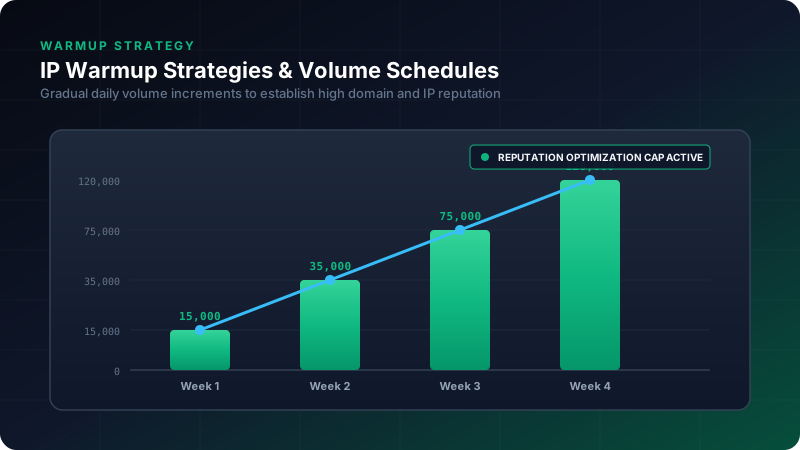
Domain warmup must follow a smooth, exponential curve. Below is a battle-tested schedule for a new domain sending mail via Google Workspace or Microsoft Office 365.
| Day / Week | Daily Email Volume | Crucial Rules |
|---|---|---|
| Week 1 (Days 1-7) | 10 – 15 emails | Manual sending only to colleagues or your own test mailboxes. You must open every email, reply to it, and mark it as “Important”. |
| Week 2 (Days 8-14) | 20 – 35 emails | Begin using automated warmup networks. Emails must be distributed evenly over a 24-hour period (never send them all in a single bulk package!). |
| Week 3 (Days 15-21) | 40 – 75 emails | You can begin sending your first real, highly-targeted, personalized B2B emails (max 15 per day). Fill the rest of the daily volume with the warmup network. |
| Week 4 (Days 22-28) | 80 – 120 emails | Transition smoothly to regular operations. Increase your daily volume by no more than 20-30% of the previous day’s volume. |
Note: If you are setting up a dedicated IP address for send volumes of 50,000+ emails per day, the warmup period extends to 6–8 weeks, and the starting volume begins at 100 emails per day.
3. Utilizing Automated Warmup Services
Manually registering hundreds of mailboxes across different providers and managing a back-and-forth conversation to warm up your domain is practically impossible. To solve this, automated warmup platforms (such as Mailreach, Lemlist, or Warmup Inbox) are used.
How Automated Warmup Networks Work:
- The service pools thousands of user mailboxes into a single distributed Peer-to-Peer (P2P) network.
- Your mailbox automatically sends emails to other boxes in the network, and they send emails to you.
- The service’s algorithms on the receiving end take all the right actions: they open the emails, pull them out of the spam folder (if they landed there), write context-aware replies (using AI), and star them as important.
- This generates flawless positive engagement metrics for Google and Microsoft spam filters.
4. Keeping Bounces Low: Automated Email List Validation
Every email sent to a non-existent mailbox (a Hard Bounce) deals a devastating blow to a new domain’s reputation. Before you launch any campaign, your lead list must be 100% clean of “dead” mailboxes.
Let’s write a Python script that implements basic email verification without sending an actual email (by checking the domain’s MX records and initiating an SMTP handshake):
import dns.resolver
import smtplib
import socket

def validate_email_address(email):
    print(f"[*] Validating address: {email}")
    try:
        name, domain = email.split('@')
    except ValueError:
        print("[-] Address syntax error.")
        return False

    # Step 1: Resolve MX records for the recipient domain
    try:
        records = dns.resolver.resolve(domain, 'MX')
        mx_record = sorted(records, key=lambda r: r.preference)[0].exchange.to_text()
        print(f"[+] Found mail server: {mx_record}")
    except Exception as e:
        print(f"[-] Could not find MX records for domain {domain}: {e}")
        return False

    # Step 2: Initiate SMTP connection and handshake
    # Note: Some providers (like Yahoo) block these types of real-time lookups
    host = socket.gethostname()
    server = smtplib.SMTP(timeout=10)
    server.set_debuglevel(0)

    try:
        server.connect(mx_record)
        server.helo(host)
        # Use a legitimate sender address
        server.mail('[email protected]')

        # Send the RCPT TO command to verify the recipient
        code, message = server.rcpt(str(email))
        server.quit()

        # Code 250 means the mailbox exists and is ready to accept mail
        if code == 250:
            print("[+] Mailbox exists (SMTP Code 250)")
            return True
        else:
            print(f"[-] Mailbox does not exist or is blocked (SMTP Code {code}: {message.decode('utf-8')})")
            return False

    except Exception as e:
        print(f"[-] Connection to mail server failed: {e}")
        try:
            server.quit()
        except:
            pass
        return False

# Test the validator
if __name__ == "__main__":
    validate_email_address("[email protected]")
5. Domain Health Monitoring: Google Postmaster Tools
The most reliable source of truth regarding your domain’s reputation when sending to Gmail is the free Google Postmaster Tools dashboard.
Be sure to add your domain there and verify ownership via a DNS TXT record. The service provides detailed graphs for several metrics:
- IP Reputation / Domain Reputation: Rated from “High” (emails land in the Inbox without issues) to “Bad” (almost 100% of emails are blocked or go straight to spam).
- Spam Rate: The percentage of spam complaints from real users. Keep this strictly below 0.1%.
- Authentication: The percentage of emails that successfully pass SPF, DKIM, and DMARC checks. This must remain at 100%.
Conclusion
Domain warmup is a process that demands patience. Attempts to skip steps or instantly blast cold campaigns to unverified lists will inevitably result in wasted budgets and the need to register new domains to replace banned ones. Follow the warmup schedule closely, keep your lists clean of dead contacts, and monitor your reputation with Postmaster Tools — and your emails will consistently find their way into your future clients’ Inboxes.
Read more professional email & outreach guides on the SuperMail blog.
Related Posts
The Impact of Email Content Structure and HTML Complexity on Inbox Delivery
A quantitative study on how excessive nested HTML tables, hidden trackers, missing plaintext fallbacks, and keyword triggers degrade spam-filter scores.
Configuring SPF, DKIM, and DMARC for Cold Outreach Without Getting Flagged as Spam
A complete guide to the deep technical configuration of email authentication protocols. How to protect your domain's reputation and guarantee Inbox delivery in 2026.
Securing Inbound Email Processing with Signed Incoming Webhooks
How to ingest thousands of emails, strip attachments safely, verify sender authentication on ingress, and stream parsed payloads via cryptographically signed webhooks.
Managing Domain Reputation and Avoiding Google Postmaster Drops
A guide to parsing feedback loops, analyzing user engagement impact, and tracking domain health matrices to guarantee consistent Inbox placement.
Mastering Email Deliverability: How to Avoid the Spam Folder
A comprehensive guide to modern email standards: SPF, DKIM, DMARC, and sender reputation.
On this page
Category
deliverability-guidesRelated Posts
The Impact of Email Content Structure and HTML Complexity on Inbox Delivery
A quantitative study on how excessive nested HTML tables, hidden trackers, missing plaintext fallbacks, and keyword triggers degrade spam-filter scores.
Configuring SPF, DKIM, and DMARC for Cold Outreach Without Getting Flagged as Spam
A complete guide to the deep technical configuration of email authentication protocols. How to protect your domain's reputation and guarantee Inbox delivery in 2026.
Securing Inbound Email Processing with Signed Incoming Webhooks
How to ingest thousands of emails, strip attachments safely, verify sender authentication on ingress, and stream parsed payloads via cryptographically signed webhooks.
Managing Domain Reputation and Avoiding Google Postmaster Drops
A guide to parsing feedback loops, analyzing user engagement impact, and tracking domain health matrices to guarantee consistent Inbox placement.
Mastering Email Deliverability: How to Avoid the Spam Folder
A comprehensive guide to modern email standards: SPF, DKIM, DMARC, and sender reputation.